Modular Graphical Interface
Overview of IDisplayModule
Overview of IDisplayModule
To make the graphical implementation flexible and independent of a specific library, we introduced a generic
IDisplayModule interface. This interface allows for easy switching between different graphical libraries, such as SFML, Raylib, or others.Interface Definition
TheIDisplayModule interface defines a set of pure virtual functions that must be implemented by any graphical library module.Explanation of Key Functions
Explanation of Key Functions
Each function in the 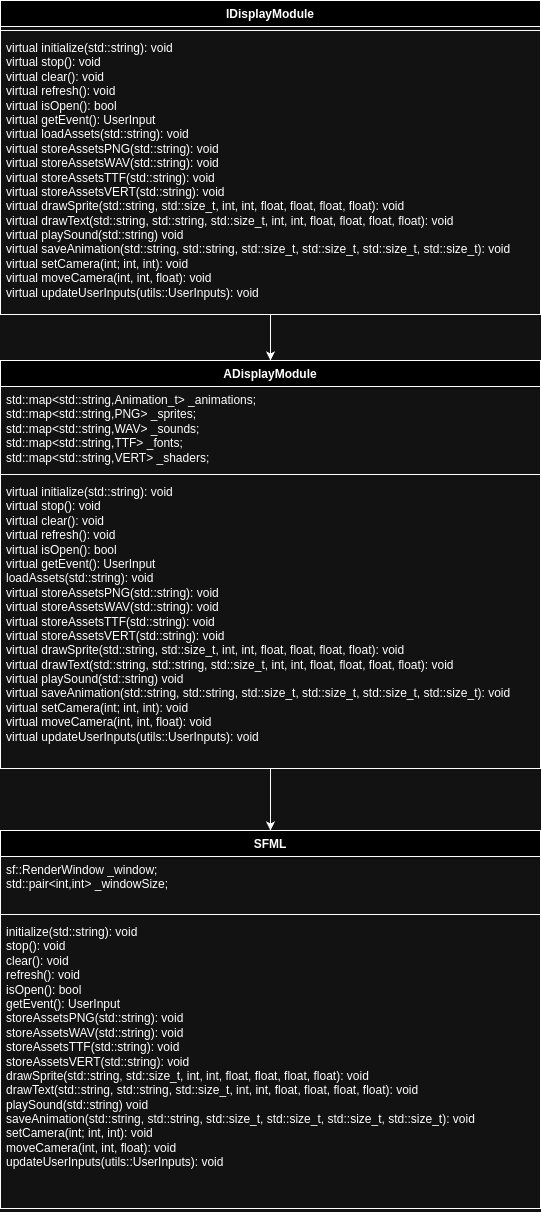
IDisplayModule class serves a specific purpose:initialize: Initialize assets and open the graphical window.stop: Clean up resources and close the graphical module.clear: Clear the screen before rendering new elements.refresh: Display updated content to the screen.isOpen: Check if the graphical window is still active.loadAssets: Load all graphical and sound assets from a folder.storeAssetsPNG: Load PNG files to use as sprites.storeAssetsWAV: Load WAV files for audio playback.storeAssetsTTF: Load TTF font files for rendering text.storeAssetsVERT: Load vertex shader files for rendering effects.configAssetsAnimations: Configure animation settings from a file.drawSprite: Render a sprite with transformations such as scale and rotation.drawText: Render text at a specific location with styling options.drawSpriteHUD: Draw sprites that appear on the HUD.drawTextHUD: Draw text elements on the HUD.playSound: Play a sound effect with volume control.saveAnimation: Save animation data for sprites.setCamera: Set the absolute position of the camera.moveCamera: Move the camera incrementally along axes.getEvent: Capture the latest user inputs (keyboard, etc.).updateUserInputs: Update the input states for use in the game engine.entryPoint: A factory function to instantiate a graphical module.
Benchmark: SFML vs Other Libraries
Benchmark Results
Benchmark Results
To demonstrate the performance of SFML, we compared it with three other popular graphical libraries:
- SDL2 (Simple DirectMedia Layer)
- OpenGL (raw API usage)
- Raylib (a lightweight alternative)
Benchmark Setup
- Scenario: Rendering 10,000 moving sprites on a 1920x1080 window.
- Frame Rate Measurement: FPS (Frames Per Second) was recorded.
- Hardware: Intel i7-8700K CPU, NVIDIA GTX 1060 GPU, 16GB RAM.
- Operating System: Ubuntu 22.04 LTS
Results
Analysis
- Performance: OpenGL offers the best FPS, but SFML and Raylib follow closely.
- Ease of Use: Both SFML and Raylib provide clean and simple APIs, reducing development time.
- Memory Usage: SFML remains efficient while offering full-featured multimedia support.
Why SFML?
Why SFML?
Key Advantages of SFML:
- Lightweight and Simple: SFML provides a straightforward API that is easy to learn and use.
- Cross-Platform: Works seamlessly on Windows, Linux, and macOS.
- Hardware-Accelerated: Leverages GPU rendering for better performance.
- Multimedia Support: Integrated support for graphics, sound, and input handling.
- Open-Source: Actively maintained and freely available under the zlib/libpng license.
Conclusion
The modular graphical interface withIDisplayModule allows us to easily integrate and test multiple libraries like SFML, Raylib, or raw OpenGL.
SFML was chosen as the initial implementation due to its balance of performance, simplicity, and ease of use. Benchmarks demonstrate that SFML performs competitively while offering a much faster development process compared to OpenGL.
Future work may involve further optimizations and providing additional implementations for Raylib and SDL2.