Prerequisites
Required Tools
Required Tools
Before you begin, make sure your environment meets the following requirements:
- C++ Compiler (G++ or Clang)
- CMake (minimum version 3.15)
- Git for cloning the repository
- vcpkg for dependency management
Install CMake and Git on Linux:
Install vcpkg:
Installation
Running the Game
Run the Server
Run the Server
The server binary is named
r-type_server. Use the following options:Run the Client
Run the Client
The client binary is named
r-type_client. Use the following options:Why Use vcpkg?
vcpkg Benchmark Comparison
vcpkg Benchmark Comparison
To explain why vcpkg was chosen as the dependency manager, a benchmark was conducted comparing vcpkg to manual installation methods and other dependency managers like Conan and Hunter.
Benchmark Setup
- Scenario: Installing and integrating the SFML library for a C++ project.
- Tools Compared: vcpkg, Conan, Hunter, and manual installation.
- Metrics: Time to install, ease of integration, and dependency resolution success.
Results
Analysis
- Setup Time: vcpkg was the fastest, reducing the overall configuration time significantly.
- Ease of Use: vcpkg integrates seamlessly with CMake, simplifying dependency management.
- Resolution Success: vcpkg provided a near-perfect resolution success rate, avoiding conflicts or missing libraries.
Project Structure
Here is an overview of the project structure:Troubleshooting
Common Issues
Common Issues
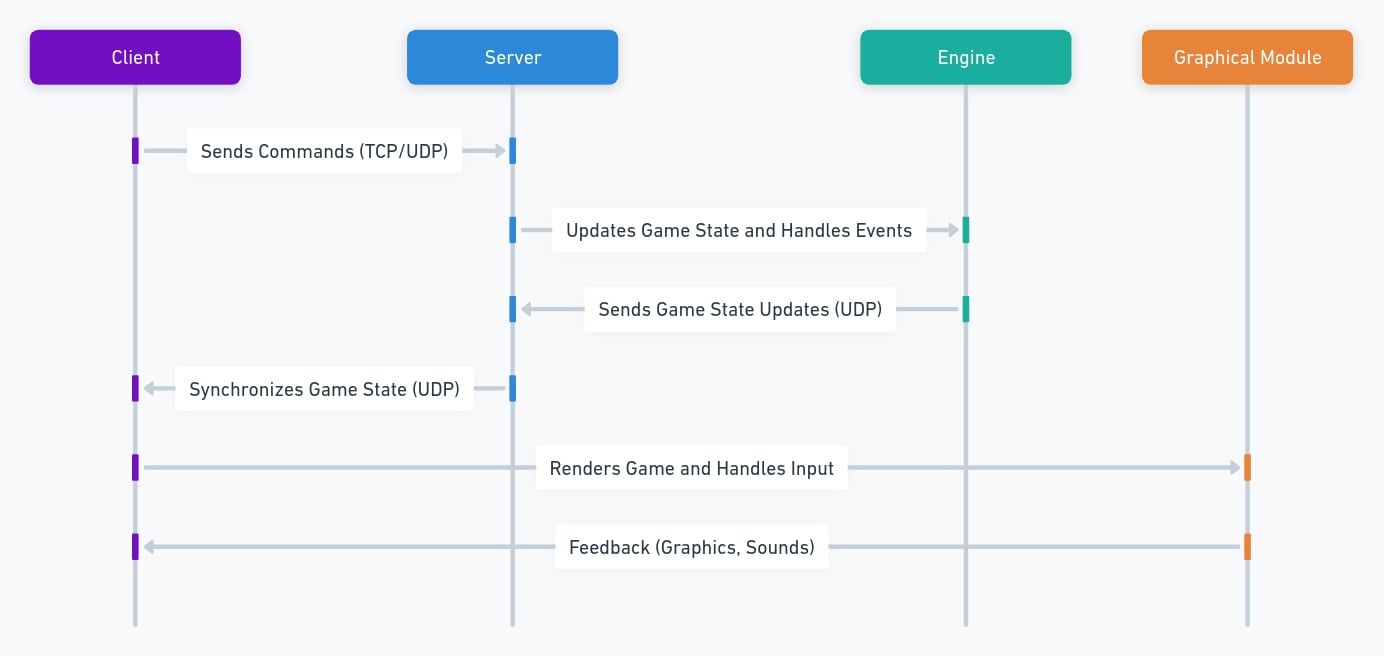
How everything work
UML Diagram
UML Diagram