- Entity Component System (ECS): A modern design pattern for performance-critical applications.
- Event Queue System: A custom event queue implementation for handling game events efficiently.
- Dynamic Libraries and Configuration Files: Extending functionality with
.sofiles and configuration files. - In-Game Console: A powerful tool for debugging and monitoring the game.
Entity Component System (ECS) Documentation
1. Introduction
1. Introduction
What is an ECS?
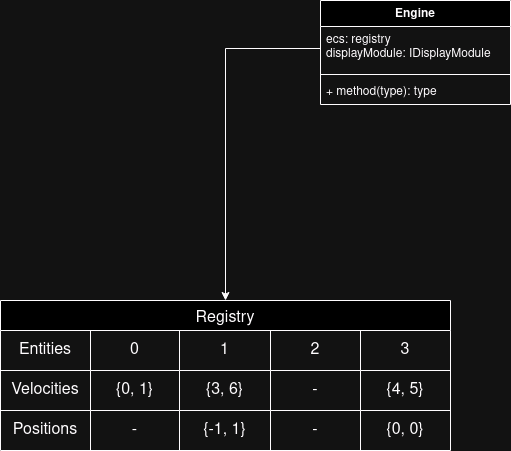
An Entity Component System (ECS) is a design pattern widely used in game development and other performance-critical applications. ECS promotes a composition-over-inheritance approach by decoupling data (components) and behavior (systems).The three core concepts of ECS are:- Entity: A unique identifier that represents an object.
- Component: A piece of data that describes the properties or state of an entity.
- System: Logic or operations that act on entities with specific components.
2. ECS Architecture
2. ECS Architecture
Entities
Entities are unique IDs (often integers) that have no behavior or data on their own. They simply act as identifiers.Components
Components are plain data structures (e.g., structs in C++). Each component represents a specific attribute of an entity.Systems
Systems are responsible for processing entities that have specific components. Systems are where the behavior/logic resides.3. ECS vs Traditional Inheritance
3. ECS vs Traditional Inheritance
Explanation:
- ECS avoids the rigid structure of deep inheritance trees by allowing entities to “compose” their behavior through components.
- Systems process only the components they care about, improving cache efficiency and performance.
4. Benchmark: ECS vs Inheritance
4. Benchmark: ECS vs Inheritance
Setup
- ECS Approach: Entities with Position and Velocity components.
- Inheritance Approach: Classes with virtual methods and inheritance.
- Operations: Update 1,000,000 entities’ positions over 1,000 iterations.
Results
Analysis
- ECS outperformed inheritance in both speed and memory usage.
- ECS leverages contiguous memory storage and avoids the overhead of virtual function calls.
5. Advantages of ECS
5. Advantages of ECS
Performance:
- Cache-friendly design improves CPU performance.
- Separation of components allows parallel processing.
Flexibility:
- Add or remove components without modifying existing code.
- Entities can be dynamically updated at runtime.
Scalability:
- ECS scales well with large numbers of entities and systems.
- Simple to extend with new components or systems.
Maintainability:
- Decouples data and logic, making the code easier to understand and maintain.
Event Queue System
Key Features
Key Features
- Event Queue: A FIFO (First-In, First-Out) structure to process events sequentially.
- Event Dispatching: Events are pushed into the queue and consumed by systems that subscribe to them.
- Decoupling: Allows for clean separation between systems and event handling logic.
Sending an Event
Sending an Event
To send an event, the engine uses the
sendEvent method. Here is an example of sending a collision event:evt::collision: Type of the event being sent.i, j: Parameters for the event (e.g., entity IDs involved in the collision).
Handling an Event
Handling an Event
Events are processed using the
resolveEvent function. Systems that listen for events handle them accordingly.Benefits
Benefits
- Decoupling: Clean separation between event producers and consumers.
- Scalability: Efficiently handles a large number of events.
- Maintainability: Simplifies debugging and testing of individual systems.
Dynamic Libraries and Configuration Files
Dynamic Libraries (.so Files)
Dynamic Libraries (.so Files)
The engine supports dynamic libraries (
.so files) to enable modularity and extend the engine’s functionality. Developers can:- Load custom systems or components at runtime.
- Extend engine features without modifying the core code.
Example
Configuration Files
Configuration Files
The engine reads configuration files for:
- Game settings: Resolution, controls, audio preferences.
- Entity definitions: Starting positions, attributes, etc.
- Network settings: Ports, IP addresses, etc.
Example Configuration File
In-Game Console
Overview
Overview
The in-game console provides developers and testers with a powerful interface to:
- Debug the game.
- Monitor performance metrics.
- Manipulate in-game entities and settings in real time.
Console Features
Console Features
Commands
help: Displays a list of available commands.debug [on | off]: Enables or disables debug logs.playSound [name]: Plays a sound by its name.metrics [on | off]: Toggles the display of performance metrics.hitbox [on | off]: Toggles the display of entity hitboxes.entities: Lists all active entities.kill [entity]: Removes an entity by its ID.
Example
Implementation
Implementation
The console is implemented as a thread-safe class that interacts with the engine:
Benefits
- Real-time debugging and monitoring.
- Simplifies testing during development.
- Provides a robust interface for manipulating the game state.